<?xml version="1.0" encoding="utf-8"?><feed xmlns="http://www.w3.org/2005/Atom" ><generator uri="https://jekyllrb.com/" version="3.10.0">Jekyll</generator><link href="https://samueldgv.com/feed.xml" rel="self" type="application/atom+xml" /><link href="https://samueldgv.com/" rel="alternate" type="text/html" /><updated>2024-12-17T16:48:31+01:00</updated><id>https://samueldgv.com/feed.xml</id><title type="html">Samuel’s blog and portfolio</title><subtitle>Samuel&apos;s blog and portfolio</subtitle><author><name>Samuel García</name></author><entry><title type="html">Lots of stuff</title><link href="https://samueldgv.com/projects/lots_of_stuff/" rel="alternate" type="text/html" title="Lots of stuff" /><published>2024-05-01T00:00:00+02:00</published><updated>2024-05-01T00:00:00+02:00</updated><id>https://samueldgv.com/projects/lots_of_stuff</id><content type="html" xml:base="https://samueldgv.com/projects/lots_of_stuff/"><![CDATA[<p>It’s been a couple of busy years since my last update in 2022, so I have quite a few updates, not only project/hobby related!</p>

<h1 id="2023">2023</h1>

<p>During this year, I finally finished my Computer Science degree. This was a really busy one, as I had quite a few interesting but challenging courses, and I also took part in a research collaboration grant.</p>

<h2 id="cool-2023-projects">Cool 2023 projects</h2>

<h3 id="computer-graphics-project">Computer Graphics project</h3>
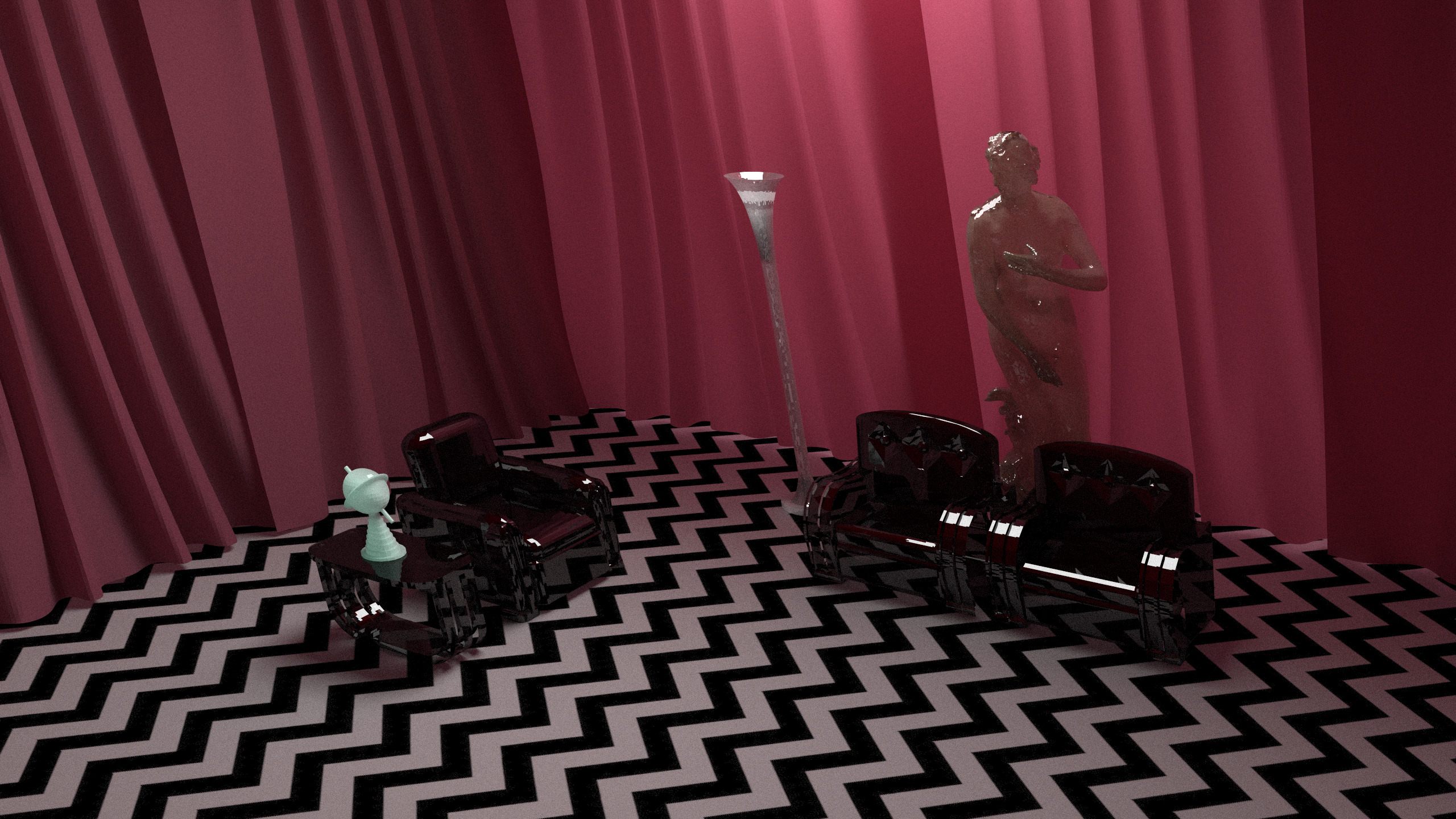
<p>We uploaded the raytracing &amp; photonmapping engine we developed as part of the Computer Graphics course (<a href="https://github.com/Sondeluz/Graphics_course_renderer">here</a>). It was purely developed in modern-ish C++ and has some niceties such as multithreading, use of acceleration structures, basic .obj file handling and an implementation of constructive solid geometry. As a showcase, we managed to render a recreation of Twin Peak’s Red Room:</p>

<p><img src="/assets/images/red_room.jpg" alt="A fancy Red Room" /></p>

<p>Also, here’s the obligatory Cornell Box:
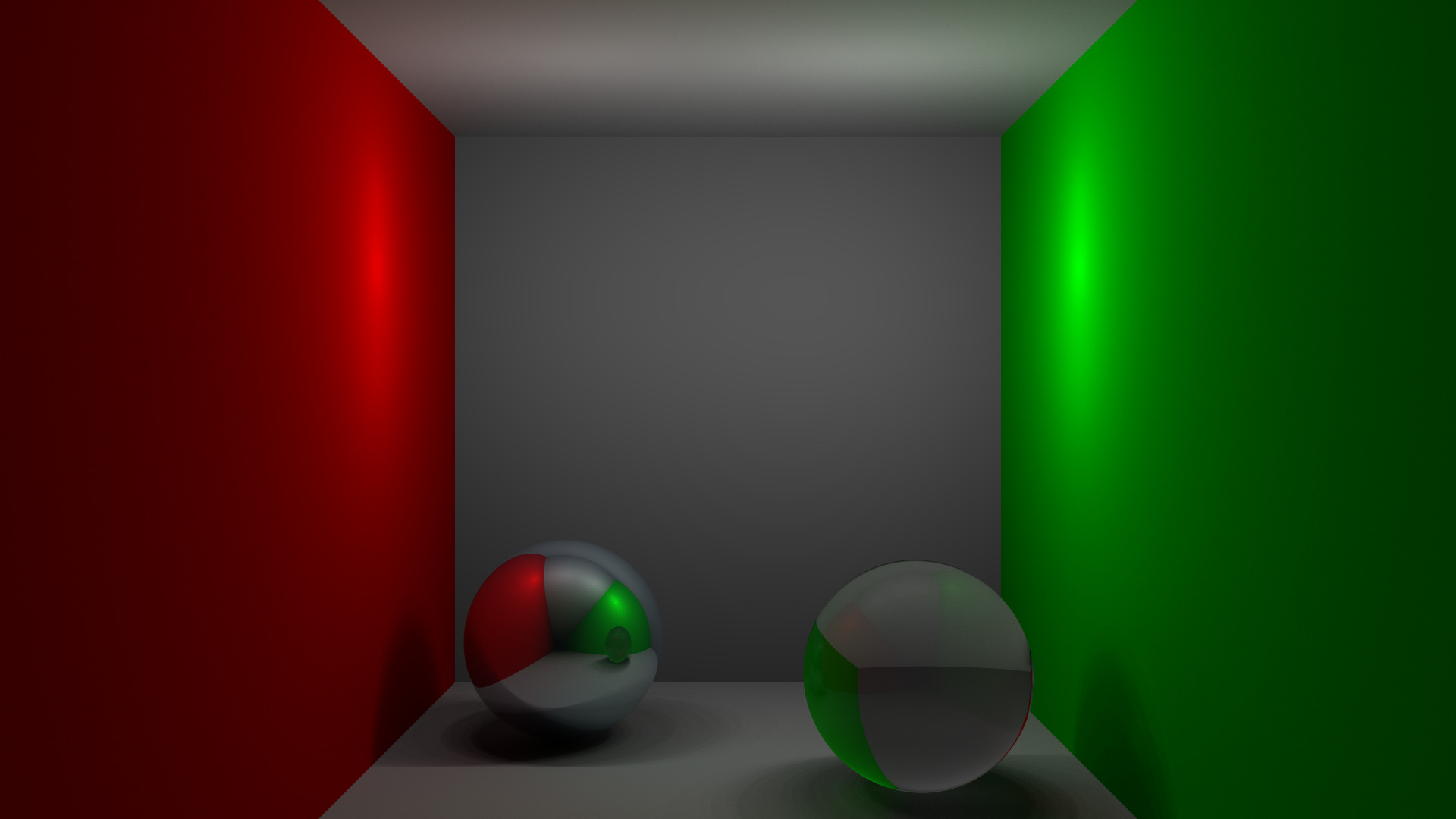
<img src="/assets/images/lame_room.jpg" alt="a lame, non-red room" /></p>

<h3 id="arm-sudoku">ARM Sudoku</h3>
<p>Although this project was developed during 2021/2022, I only went around <a href="https://github.com/Sondeluz/ARM_sudoku">uploading it</a> half a year ago. This is a fully functional Sudoku game playable through the <code class="language-plaintext highlighter-rouge">GPIO</code> and containing visualizations for both the <code class="language-plaintext highlighter-rouge">UART</code> console and the <code class="language-plaintext highlighter-rouge">GPIO</code> itself, for the <code class="language-plaintext highlighter-rouge">LPC2105 ARM7TDMI-S</code> CPU (simulated through <code class="language-plaintext highlighter-rouge">Keil uVision</code>). It was developed on a mix of C and ARM assembly (for interrupt handling, power saving…), with an event queue architecture.</p>

<h3 id="research-collaboration">Research collaboration</h3>

<p>Most of my time during 2022 and 2023 was dedicated to a research collaboration at the <a href="http://sid.cps.unizar.es/">SID group</a>. Thanks to this opportunity, I was able to delve into State-Of-The-Art techniques within fields such as Natural Language Processing (use of LLMs, NLP libraries…) and Semantic Information Retrieval (Knowledge Graphs, IR indexing engines such as elastic…). This collaboration has been extended until today, and we already have a conference paper pending for review. I can’t wait to make the repo public, as it’s my biggest project yet :)</p>

<h1 id="2024">2024</h1>

<p>During this year, I finished my CS degree and moved to Barcelona for an MSc. in Intelligent Interactive Systems at Universitat Pompeu Fabra. During this year, I have been able to delve more into Natural Language Processing and AI/Machine Learning, with some Data Science in between. As a cherry on the cake, I’m also doing an intership at the European Commission’s Joint Research Centre.</p>

<p>…It’s been a way busier year.</p>

<h2 id="cool-2024-projects">Cool 2024 projects</h2>

<h3 id="indexermcindexface">IndexerMcIndexFace</h3>
<p>During my research collaboration, I relied quite a lot on different <a href="https://en.wikipedia.org/wiki/Okapi_BM25">BM25 / BM25F</a> implementations for document retrieval. I found most of them lacking in different aspects, such as parameter tweaking freedom or even transparency due to straight-up weird behaviors. I wanted to see just how hard it really was to implement a (very basic) BM25F ranking function, so I wrote <a href="https://github.com/Sondeluz/IndexerMcIndexFace">a really tiny-but-fast document indexing and retrieval system</a>. I also used it as an excuse to play with <a href="https://en.wikipedia.org/wiki/Finite-state_machine">FSTs</a> and Rust’s parallelization capabilities, as I wrote it exclusively in Rust.</p>

<h3 id="computational-semantics-course">Computational Semantics course</h3>
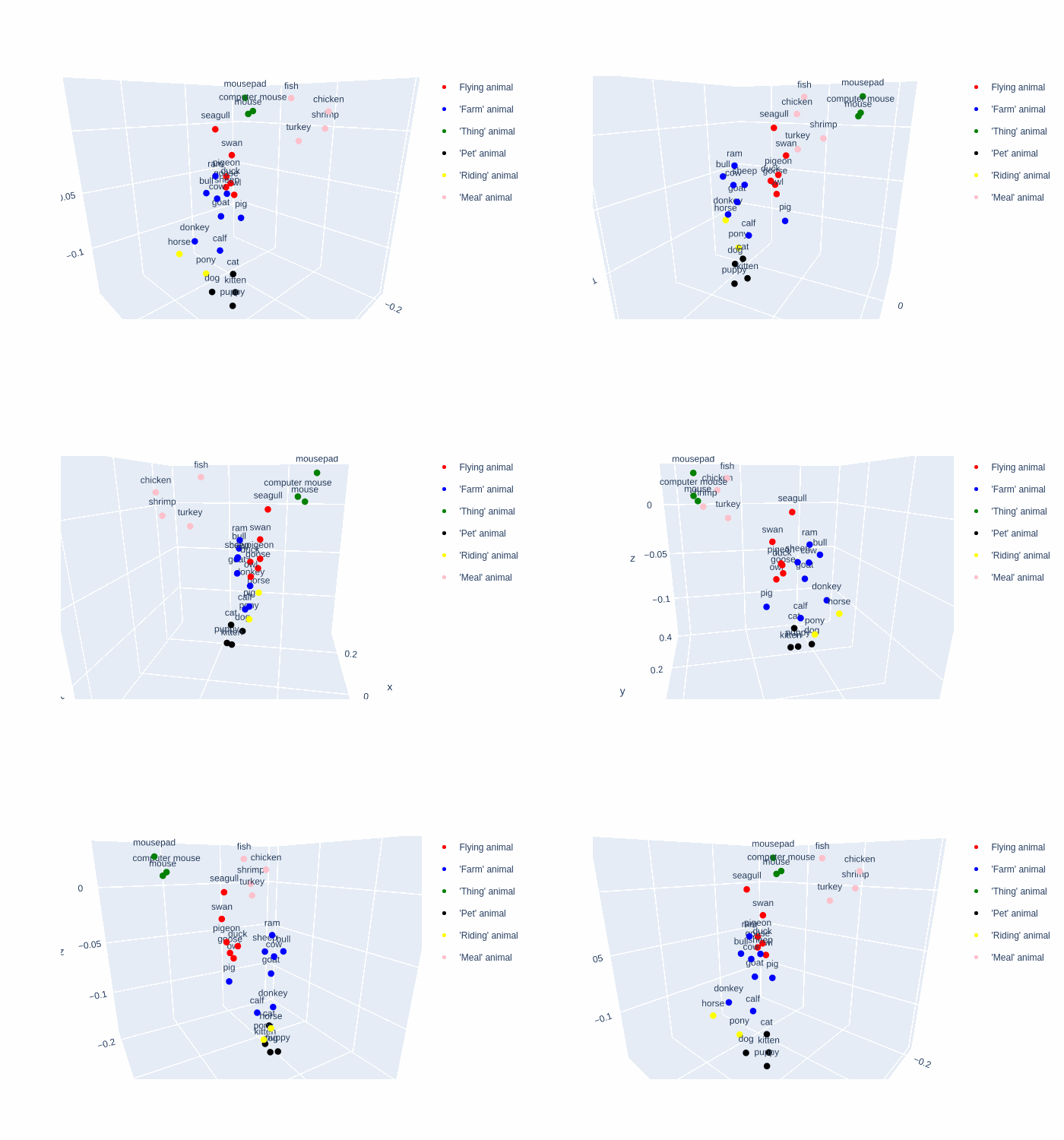
<p>As part of my Master’s, I took a course on Computational Semantics, where I worked on a wide range of NLP techniques, starting from “traditional” ones (use of WordNet and other corpora, static embeddings…) until reaching the State-Of-The-Art (contextual embeddings, multimodal LLMs…). I uploaded two of the most fancy projects <a href="https://github.com/Sondeluz/ComputationalSemantics">here</a>.</p>

<p><img src="https://github.com/Sondeluz/ComputationalSemantics/blob/main/visualization_example.gif?raw=true" alt="Cool, rotating CLIP embeddings" /></p>

<h3 id="conversational-agent">Conversational Agent</h3>
<p>We also developed the inner systems of a Conversational Agent custom-tailored for Hotel and Restaurant requests, as part of a Natural Language Interaction course. I published its Named Entity Recognition module, which was the system I worked the most on, <a href="https://github.com/Sondeluz/Conversational-Agent-NER">here</a>. It consists of a NER system for the Semantic frame slot filling task of a Conversational Agent, trained and evaluated using the <code class="language-plaintext highlighter-rouge">MultiWOZ</code> dataset. This is made up of different components, as we went a bit beyond simply detecting direct mentions of entities in sentences:</p>
<ul>
  <li>A NER system based on a Deberta-v3-base model, fine-tuned using the <code class="language-plaintext highlighter-rouge">flair</code> NLP library.
    <ul>
      <li>Detects directly mentioned slots (restaurant food types, restaurant and hotel names…)</li>
      <li>Detects <code class="language-plaintext highlighter-rouge">question</code> and <code class="language-plaintext highlighter-rouge">dontcare</code> direct mentions</li>
    </ul>
  </li>
  <li>A K-Nearest Neighbors classifier that is fed scaled sentence embeddings of user utterances using <code class="language-plaintext highlighter-rouge">bge-large-en-v1.5</code>, which was used to classify <code class="language-plaintext highlighter-rouge">question</code> and <code class="language-plaintext highlighter-rouge">dontcare</code> user utterances that indirectly refer to previously mentioned slots.</li>
</ul>

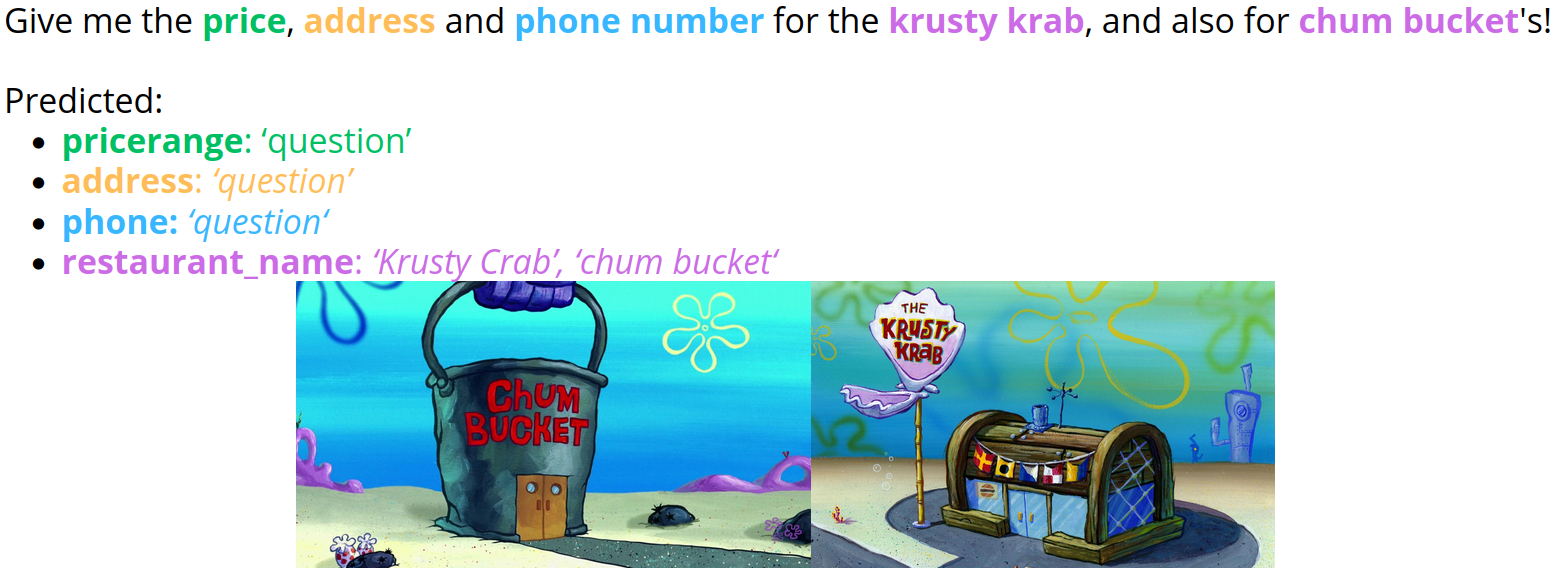
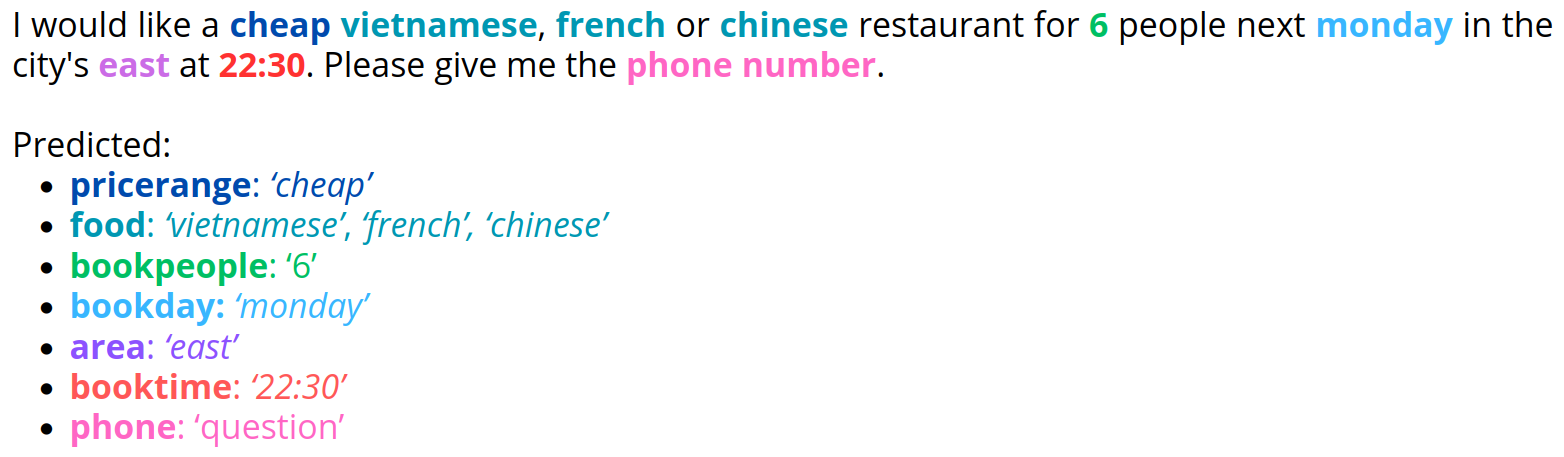
<p>As a picture is worth a thousand words, here’s how our NER system works when talking about SpongeBob entities (which we really hope the dataset didn’t contain), and when the user prompts the system with a question alongside many other entity mentions.</p>

<p><img src="/assets/images/conversational_agent_1.png" alt="screenshot" />
<img src="/assets/images/conversational_agent_2.png" alt="screenshot" /></p>

<p>The whole system will be uploaded soon, as might more projects that we did in other subjects!</p>]]></content><author><name>Samuel García</name></author><category term="Projects" /><category term="Computer_graphics," /><category term="AI," /><category term="NLP," /><category term="C," /><category term="C++," /><category term="Assembly," /><category term="Rust" /><summary type="html"><![CDATA[It’s been a couple of busy years since my last update in 2022, so I have quite a few updates, not only project/hobby related!]]></summary></entry><entry><title type="html">Flowfields</title><link href="https://samueldgv.com/projects/Flowfields/" rel="alternate" type="text/html" title="Flowfields" /><published>2022-02-07T00:00:00+01:00</published><updated>2022-02-07T00:00:00+01:00</updated><id>https://samueldgv.com/projects/Flowfields</id><content type="html" xml:base="https://samueldgv.com/projects/Flowfields/"><![CDATA[<p>As part of my courses, I have studied different pathfinding techniques, but flowfields were not among them. These are used in videogames for crowd’s pathfinding as a cheaper alternative to the A* algorithm, so I have implemented a basic demo for this pathfinding technique in a concurrent environment (using Go, as it makes concurrency and synchronization extremely easy).</p>

<video controls="" width="600" height="400" muted="" loop="" autoplay="">
<source src="https://github.com/Sondeluz/sondeluz.github.io/raw/master/assets/images/flowfields.mp4" type="video/mp4" />
</video>

<p>This is a very limited demo as I did it in just a couple of days, and is loosely based on the guides from https://howtorts.github.io/</p>

<p>Its current limitations are:</p>
<ul>
  <li>
    <p>There are no physics (velocity, collisions, etc.): every agent moves exactly one cell per movement, based on its current cell neighbours and other agents which may be occupying these cells.</p>
  </li>
  <li>
    <p>There are no predictions and look-aheads, since there is a hard constraint which mandates that no two agents can occupy the same cell at any given time.</p>
  </li>
  <li>The structure is designed for debugging rather than performance and usability:
    <ul>
      <li>The solution is inherently concurrent but forces each agent to synchronize with a barrier in order to coordinate their movements and render them.</li>
      <li>Each agent has one flowfield irregardless of other agents who may have the same objective, and also share a shared flowfield for tracking other agents. These two structures should be joined together in order to not duplicate data.</li>
    </ul>
  </li>
  <li>The obstacle functionality is implemented, but not tested.</li>
</ul>

<p>The source is available <a href="https://github.com/Sondeluz/Flowfields-demo">here</a></p>]]></content><author><name>Samuel García</name></author><category term="Projects" /><category term="Pathfinding," /><category term="AI," /><category term="Go," /><category term="Golang" /><summary type="html"><![CDATA[As part of my courses, I have studied different pathfinding techniques, but flowfields were not among them. These are used in videogames for crowd’s pathfinding as a cheaper alternative to the A* algorithm, so I have implemented a basic demo for this pathfinding technique in a concurrent environment (using Go, as it makes concurrency and synchronization extremely easy).]]></summary></entry><entry><title type="html">CHIP8</title><link href="https://samueldgv.com/projects/CHIP8/" rel="alternate" type="text/html" title="CHIP8" /><published>2021-09-03T00:00:00+02:00</published><updated>2021-09-03T00:00:00+02:00</updated><id>https://samueldgv.com/projects/CHIP8</id><content type="html" xml:base="https://samueldgv.com/projects/CHIP8/"><![CDATA[<p>I have implemented a CHIP-8 VM, based on <a href="https://github.com/starrhorne/chip8-rust">starrhorne’s</a> amazing CHIP-8 emulator.
I wanted to play with Rust’s low-level stuff and work on a small emulator, and this was a great choice.
Since it is pretty much based on starrhorne’s project, I forked it. Some parts of it are the same source files, self-commented, with a few tweaks here and there which don’t really change the overall behavior.</p>

<p><img src="https://github.com/Sondeluz/sondeluz.github.io/blob/master/assets/images/chip8.gif?raw=true" alt="Example of the CHIP8 emulator running Blitz" /></p>

<p>I added a few functions such as being able to see the CPU registers, stack contents and a small instruction history,
which requires providing a valid .ttf file for displaying text. I included one (Terminus TTF) in the project.</p>

<p>I also moved around some structural parts, such as the timers which now reside in a separate thread running at 60Hz.</p>

<p>Finally, it is also possible to:</p>

<ul>
  <li>Pause the emulation by pressing the spacebar.</li>
  <li>Increase the game’s frequency by pressing the Up arrow. (Doesn’t affect the timers)</li>
  <li>Decrease the game’s frequency by pressing the Down arrow. (Doesn’t affect the timers)</li>
  <li>Toggle sprite wrapping on/off, as some games require wrapping, and others not (via arguments).</li>
</ul>

<p>Overall, this was a nice project to study and mess with, maybe some day I will tackle a more complex emulator.</p>

<p>More information, including the project’s source code, is available <a href="https://github.com/Sondeluz/chip8-rust">here</a></p>]]></content><author><name>Samuel García</name></author><category term="Projects" /><category term="Emulators," /><category term="Rust" /><summary type="html"><![CDATA[I have implemented a CHIP-8 VM, based on starrhorne’s amazing CHIP-8 emulator. I wanted to play with Rust’s low-level stuff and work on a small emulator, and this was a great choice. Since it is pretty much based on starrhorne’s project, I forked it. Some parts of it are the same source files, self-commented, with a few tweaks here and there which don’t really change the overall behavior.]]></summary></entry><entry><title type="html">BMO-Boy!</title><link href="https://samueldgv.com/projects/bmo-boy/" rel="alternate" type="text/html" title="BMO-Boy!" /><published>2021-08-22T00:00:00+02:00</published><updated>2021-08-22T00:00:00+02:00</updated><id>https://samueldgv.com/projects/bmo-boy</id><content type="html" xml:base="https://samueldgv.com/projects/bmo-boy/"><![CDATA[<p>One of my summer projects was to build a BMO robot, with help of a 3D printer and a custom software stack developed on my own. Today, I’m presenting my own customised BMO-Boy!</p>

<p>This project is based on <a href="https://byobmo.com/bmo-boy/">Orbian’s BMO-Boy</a>, with a few differences here and there.</p>

<p>I basically ditched the robotics and instead opted into making a somewhat complicated software stack for powering BMO, since I wanted to play with voice recognition and use somewhat complex libraries. Along the way, I also realized I could easily implement this in Rust, a language which I also wanted to tinker with this summer.</p>

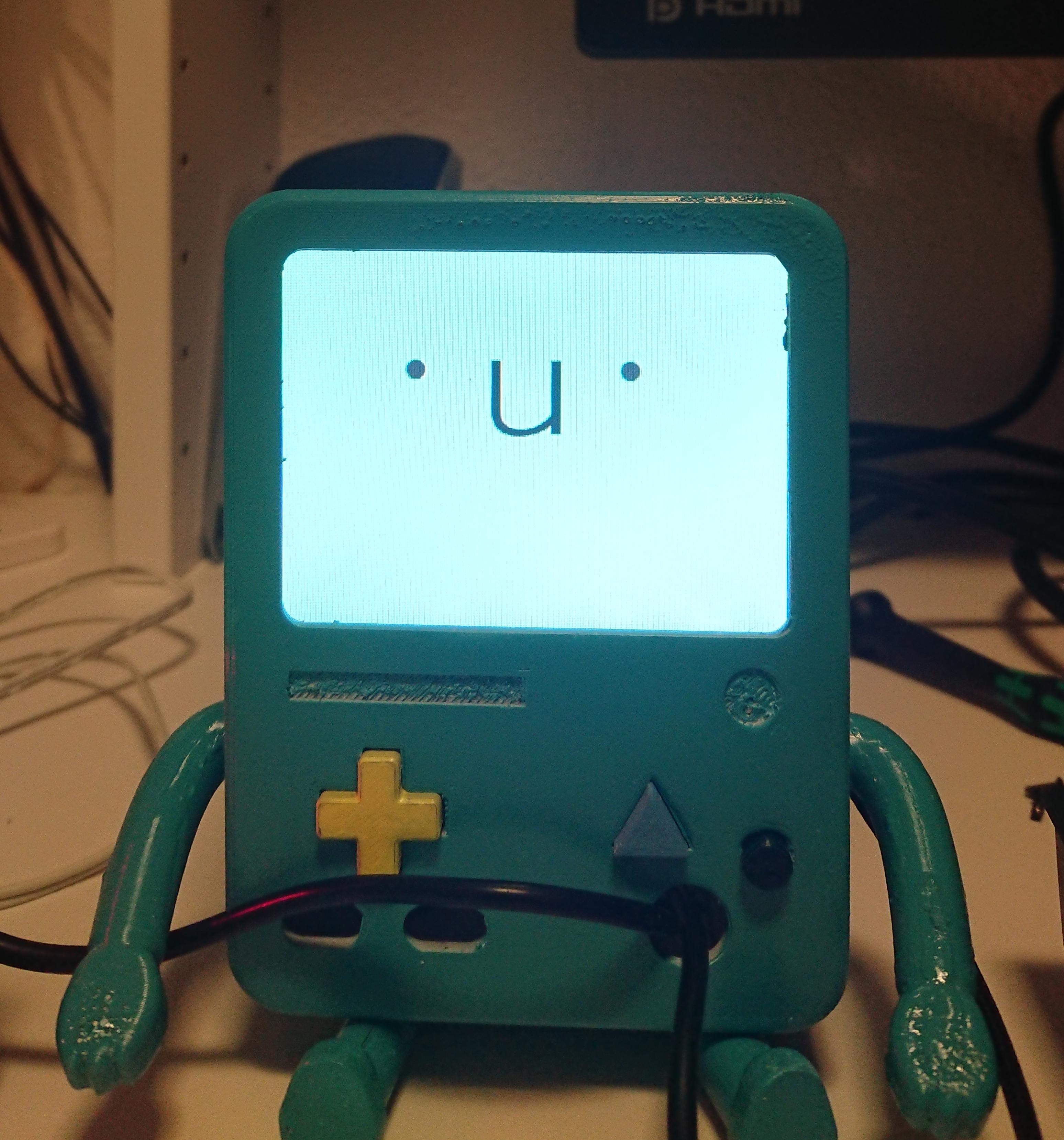
<p>The result is this!</p>

<p><img src="/assets/images/bmo.jpg" alt="alt" /></p>

<p><a href="https://www.youtube.com/watch?v=zFUsgyLgnSU">And here’s BMO saying hi!</a></p>

<h1 id="hardware-details">Hardware details</h1>

<p>My own BMO-Boy is using the following hardware parts, which differ a bit from Orbian’s design:</p>

<ul>
  <li>Instead of <a href="https://www.adafruit.com/product/913">Adafruit’s 3.5” TFT screen</a>, I used a suspiciously similar one found on <a href="https://es.aliexpress.com/item/32891740014.html?spm=a2g0o.productlist.0.0.2e387f1cKco3Rm&amp;algo_pvid=3c26288e-44e3-405b-a515-61114eb05d74&amp;algo_exp_id=3c26288e-44e3-405b-a515-61114eb05d74-1">Aliexpress</a>, which only differs on the controller board used. Its only drawback is that its mounting holes are extremely small for the 3d model screw holes, so it will be crammed inside BMO without being mounted (Not that it will have much space!)</li>
  <li>I used a Raspberry Pi Zero W, and a <a href="https://shop.pimoroni.com/products/respeaker-2-mics-phat">ReSpeaker 2-Mics pHAT</a> for audio input and output. Nothing else.</li>
  <li>In order to save a little more money, I didn’t use any batteries. I opted instead to just plugging the Pi Zero to a charger, and the screen to a DC charger.</li>
  <li>I bought a GPIO header extender in order to make space between the HAT and the Pi Zero for the RCA cables, which have to be soldered into the Pi Zero in order to get video output to the screen. I used solderless dupont-to-female RCA connector <a href="https://es.aliexpress.com/item/32791653391.html">like this</a> to simplify things.</li>
  <li>I used m2.5 brass inserts and screws for fixing the Pi Zero and its HAT to the backplate, and also for fixing the backplate to the main body (since I only had m2.5 screws, I had to drill through its holes)</li>
</ul>

<p>The HAT’s purpose will be picking up and streaming audio into a (hopefully) more powerful computer.</p>

<p>As for the 3D print, I simply printed Orbian’s model and painted it with Tamiya’s TS41 spray paint, which was the closest color to BMO’s I could get my hands onto. Orbian has a handy guide for its building on <a href="https://www.youtube.com/watch?v=UY7KtQ0_uEA&amp;list=PLrGvjybxwjjIljFEU5U4FRtXl0vng1u0p">youtube</a>, though the only relevant part here would be painting it.</p>

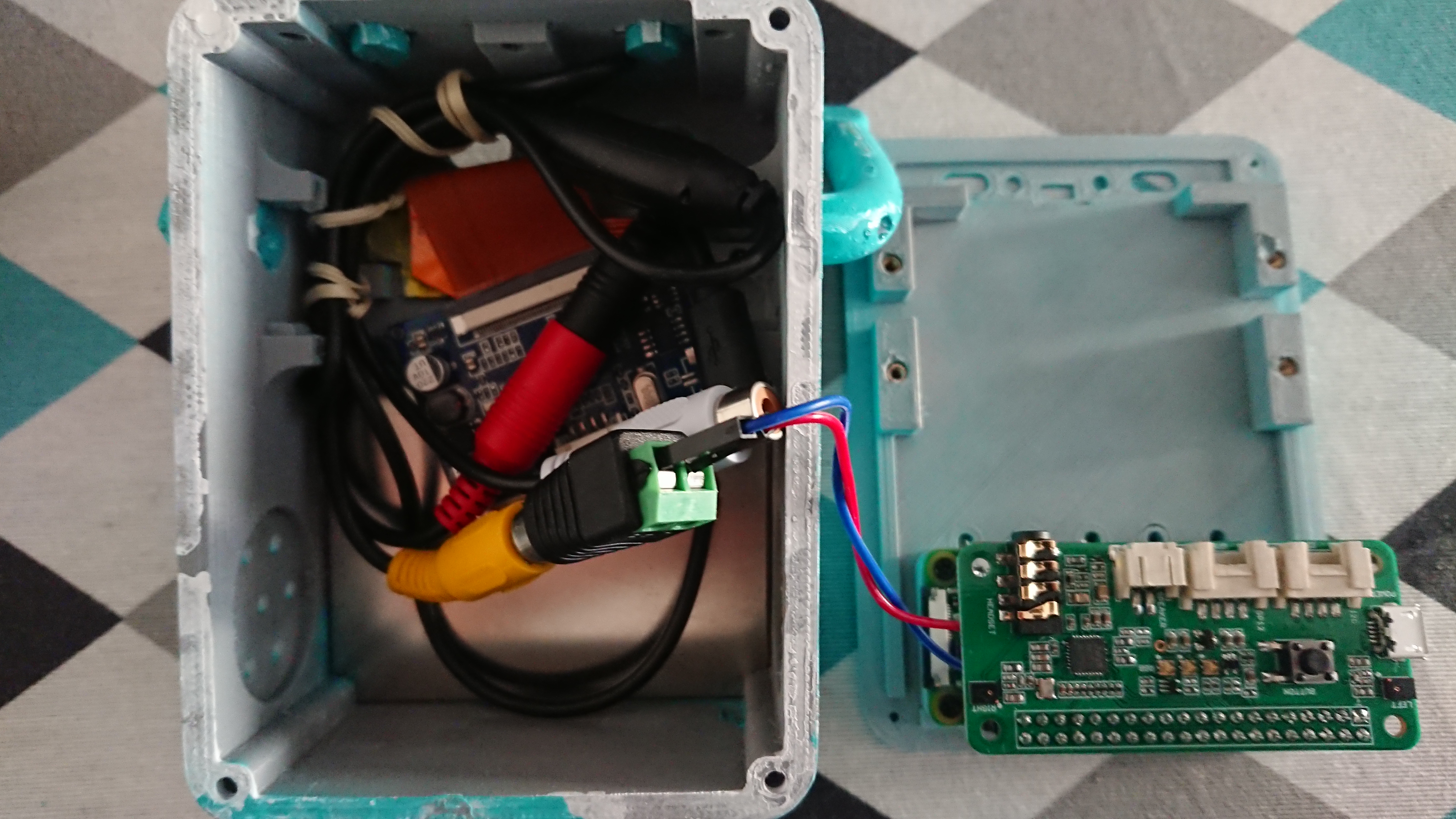
<p>The components barely fit inside, so maybe another 3D model could be better. Other contenders would be <a href="https://www.thingiverse.com/thing:4723578">this one</a>, which I attempted to print but didn’t have enough precision for the screws, and <a href="https://www.thingiverse.com/thing:4804405">this improved version</a> which I haven’t tried.</p>

<p><img src="/assets/images/bmos_inside.jpg" alt="alt" />
It is rather tight in there…</p>

<h1 id="software-details">Software details</h1>

<p>The software running BMO consists of three parts:</p>

<ul>
  <li><a href="http://voice2json.org/">voice2json</a>, which is an amazing software which turns audio input into recognized (and configurable) intents with a confidence value associated to them, by making use of trained ML Speech Recognition models.
    <ul>
      <li>voice2json will be in charge of parsing the audio input picked up by the raspberry’s HAT into intents.</li>
      <li>As its name indicates, the output will be in form of JSON strings, so we will need a parser for it, which will be the client!</li>
    </ul>
  </li>
  <li>A simple client, which is in charge of:
    <ul>
      <li>Listening for JSON input from stdin and parsing it into intents.</li>
      <li>Sending intents with enough confidence to the server.</li>
    </ul>
  </li>
  <li>A <del>somewhat misleading</del> server, which is in charge of:
    <ul>
      <li>Displaying BMO’s face to the screen, and playing audio tracks.</li>
      <li>Listening over the network for intents, which dictate which faces and audio tracks should be played.</li>
    </ul>
  </li>
</ul>

<p>Both voice2json and the client will be running on a proper computer, and the server will be running on the Pi Zero. The reason for this is that the Pi Zero is not exactly really powerful, and cramming both machine learning, JSON parsing and a “game” into a 1-core ARM CPU is not really a good idea.</p>

<p>The client and server are both written in Rust. While the client is somewhat simple, the server makes use of more complex libraries such as SDL (for displaying graphics), and Soloud (for playing audio). It also makes extensive use of Rust’s amazing concurrency capabilities, which was a great learning experience!</p>

<h1 id="functionalities">Functionalities</h1>

<p>BMO’s functionalities are the following:</p>
<ul>
  <li>It can recognise an arbitrary number of speech expressions, as long as they are associated to simple intents (<code class="language-plaintext highlighter-rouge">anger</code>, <code class="language-plaintext highlighter-rouge">surprise</code>, <code class="language-plaintext highlighter-rouge">sing_a_song</code>, <code class="language-plaintext highlighter-rouge">say_hello</code>…)</li>
  <li>It can match an arbitrary number of faces and (optionally) audio tracks to each intent. The result is that BMO can answer to intents with:
    <ul>
      <li>A randomised static face image among those associated with the intent, with a configurable time limit.</li>
      <li>A series of (also randomised) faces switching at fixed intervals while an audio track plays in the background (<strong>In other words, BMO can speak anything in any way you want!</strong>)</li>
      <li>An associated function. Currently, BMO can:
        <ul>
          <li>Display the current weather. (This can be opted-out from, since it requires an API key from openweathermap)</li>
          <li>Configure (by voice!) and display a chronometer, with a configurable alarm playing at the end.</li>
        </ul>
      </li>
    </ul>
  </li>
</ul>

<h1 id="the-setup">The setup</h1>
<p>All software is intended to run on Linux (voice2json included).</p>

<ul>
  <li>
    <p>On the Pi Zero’s side, any Linux distribution should work, as long as it has the SDL2, SDL2-image, SDL2-ttf and openAL libraries required to run the server. I used a headless Raspbian image with no DE installed, which I controlled via SSH. bmOS_server should automatically pick up the display and show itself in fullscreen mode.</p>
  </li>
  <li>
    <p>On the “auxiliary” host’s side, again any distribution should work, as long as it can run voice2json. I used Arch Linux alongside a Docker image for voice2json. There are native voice2json packages for Debian available, too.</p>
  </li>
  <li>
    <p>In order to pick up and stream audio from the Pi zero’s microphones, an external solution should be found for this. I simply used a bash script to record and transmit audio via SSH, from the host which is running the client. The script is detailed in the <a href="https://crates.io/crates/bmos_client">client’s documentation</a>, but any other solution can be used as long as it’s accepted by voice2json.</p>
  </li>
  <li>
    <p>In order to get audio from the raspberry and hear BMO’s voice, the 3.5mm jack in the HAT can be used, but it adds yet another cable to manage. I chose to simply stream it too.</p>
  </li>
</ul>

<h1 id="source-code">Source code</h1>

<ul>
  <li>
    <p>Everything is open source, so anyone can play with it. I doubt anyone will want to make use of this since it is quite a simplistic and specific project, but who knows!</p>
  </li>
  <li>
    <p>The source code for the client is hosted <a href="https://github.com/Sondeluz/bmOS_client">on Github</a> and <a href="https://crates.io/crates/bmos_client">crates.io</a>, with its more in-depth documentation hosted <a href="https://docs.rs/bmos_client/1.0.1">on docs.rs</a></p>
  </li>
  <li>
    <p>The source code for the server is hosted also <a href="https://github.com/Sondeluz/bmOS_server">on Github</a> and <a href="https://crates.io/crates/bmos_server">crates.io</a>, with its documentation hosted <a href="https://docs.rs/crate/bmos_server/">on docs.rs</a></p>
  </li>
  <li>
    <p>voice2json, synesthesiam’s project, is hosted <a href="https://github.com/synesthesiam/voice2json">here</a>, with its documentation hosted <a href="http://voice2json.org/">in its main webpage</a>.</p>
  </li>
</ul>

<h1 id="assets">Assets</h1>

<p>Since all assets should be for personal use, I didn’t include them in the source code in order to avoid any potential problems. I simply ripped audio tracks from the show, and used Orbian’s face assets hosted <a href="https://byobmo.com/faces/">here</a>, along with a few of my own, so that there could be more variety when talking. Nonetheless, feel free to send me an email at <code class="language-plaintext highlighter-rouge">bmo@samueldgv.com</code> if you want my assets.</p>]]></content><author><name>Samuel García</name></author><category term="Projects" /><category term="BMO," /><category term="Rust" /><summary type="html"><![CDATA[One of my summer projects was to build a BMO robot, with help of a 3D printer and a custom software stack developed on my own. Today, I’m presenting my own customised BMO-Boy!]]></summary></entry></feed>